

Sign in and reset your password
There are two ways into Rowseta:
- Sign in with email and password at your Rowseta address if you have a direct account.
- Open Rowseta from Brightspace. See Brightspace launch members for launch identity and access.
Sign in
Section titled “Sign in”- Go to your Rowseta address, for example
https://big-brain.rowseta.com. - Enter your Email and Password, then select Sign in.
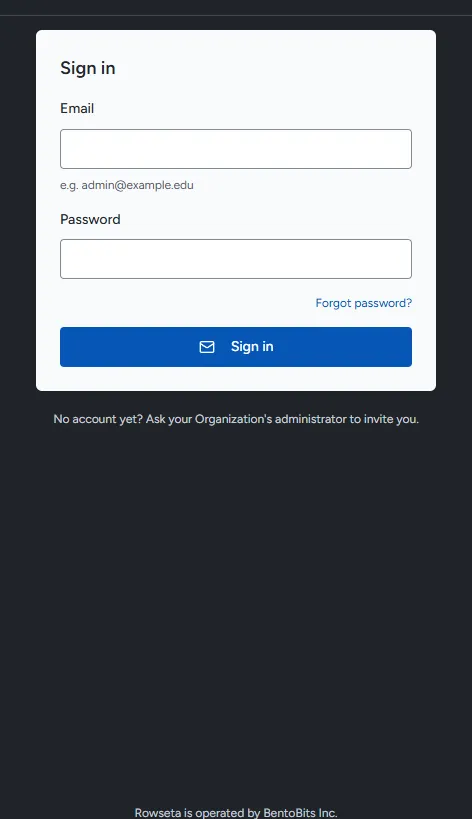
If you do not have an account yet, ask for an invitation.
If you don’t see this menu or button, your role doesn’t include it. Ask someone who can edit roles (Owners and Admins by default).
Accept an invitation
Section titled “Accept an invitation”- Open the email “You’ve been invited to <Organization> on Rowseta” and select Set your password. The link expires in 7 days and works once.
- Enter a password of at least 12 characters, confirm it, and select Set password.
- Sign in at your Rowseta address with your email and new password.
After signing in, use Change password in the user menu to change it. Enter your current password when asked.
Reset your password
Section titled “Reset your password”- On the sign-in page, select Forgot password?.
- Enter your email and select Send reset link.
- Open the email “Reset your Rowseta password” and select Reset Password. The link expires in 1 hour.
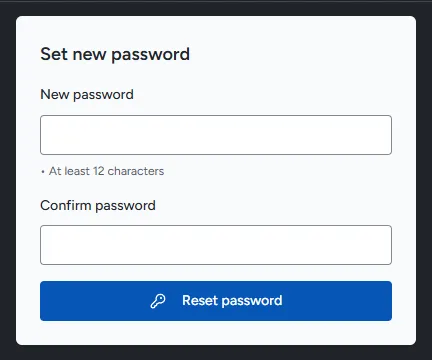
- Enter a New password of at least 12 characters, enter it again in Confirm password, and select Reset password.
After a reset, all your sessions are signed out. Sign in again with the new password.
Sign out
Section titled “Sign out”Open the user menu (your initials) at the top right and select Sign out.