

What each LTI role can do
A Brightspace launch sends the person’s LTI role in the course. Rowseta maps recognized roles to a Rowseta role; an empty or unrecognized role becomes No Access. You cannot edit the mapping, but you can change a person’s role afterwards in People.
The fixed launch mapping
Section titled “The fixed launch mapping”| Brightspace LTI role | Rowseta role |
|---|---|
| Administrator | Instructor |
| Instructor | Instructor |
| Teaching Assistant | Instructor |
| Content Developer | Instructor |
| Learner | Student |
| Mentor | No Access |
| Anything else or empty | No Access |
The mapping cannot be edited. When several recognized LTI roles arrive together, Rowseta uses the most privileged bounded mapping. A role assigned by hand in People is kept on later launches. The widget’s placement and audience still affect what appears in the signed course. The fixed launch and Configure rules explain access.
If you don’t see this menu or button, your role doesn’t include it. Ask someone who can edit roles (Owners and Admins by default).
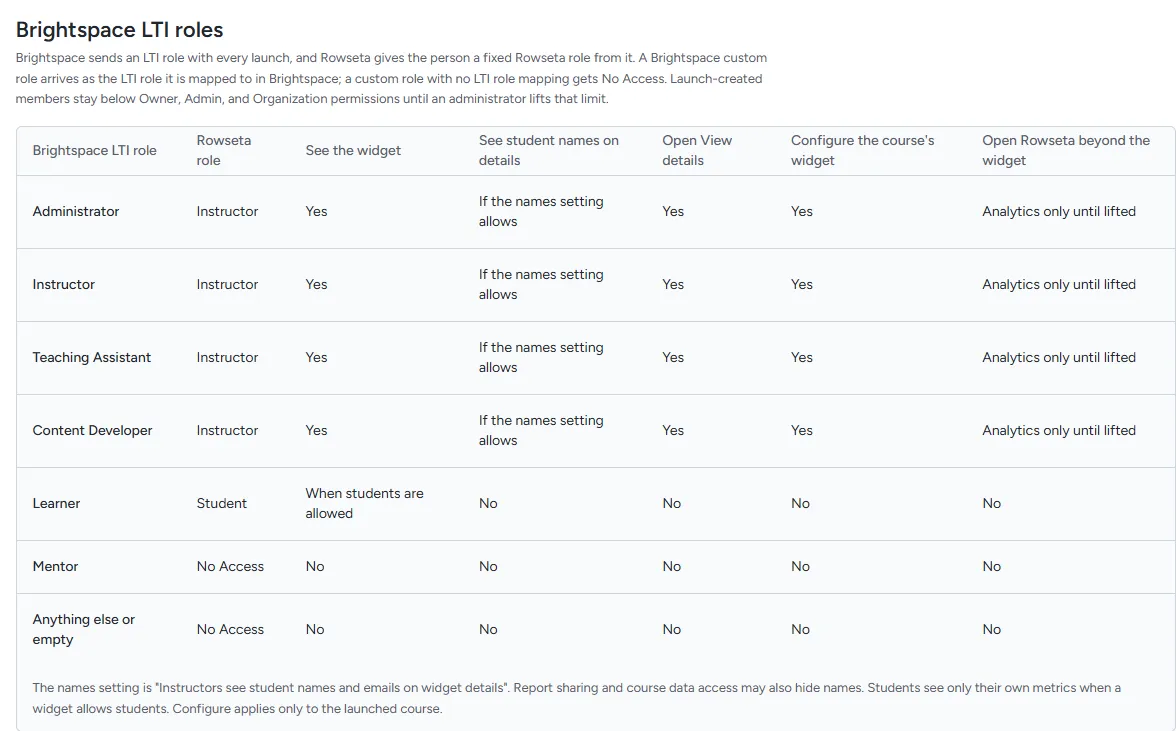
The full capability table appears in Rowseta under Settings > Roles and permissions. The role names there reflect any changes your Organization has made.
When the role is decided
Section titled “When the role is decided”- The first launch by a person creates their Rowseta member with the mapped role.
- Later launches update the role from the new LTI role, unless someone has set the person’s role by hand in People. A role set by hand is kept.
When a launch is refused
Section titled “When a launch is refused”See the fixed launch rules and Brightspace launch messages. If a person needs a different role, use Brightspace launch members.