What insight widgets are
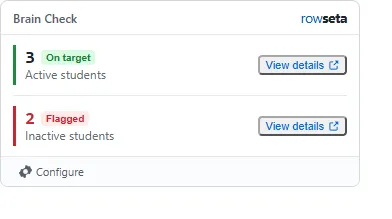
An insight widget is a small card that sits in a Brightspace course homepage widget. It shows one or more metrics, such as “Active students: 3” or “Inactive students: 2”, each calculated from a published report and limited to the course it is opened in.
What makes them useful
Section titled “What makes them useful”- In the course, not in another tool. The numbers appear on the Brightspace course homepage when the signed launch and placement allow viewing.
- Limited to the course. A widget opened in THINK 101 only ever counts THINK 101’s data.
- No accounts to create. Opening the course signs the person in to Rowseta. See Brightspace launch members.
- Alerts. A metric can turn red and read Flagged when it crosses a threshold you set.
- Details on demand. View details opens the rows behind a number, such as the list of inactive students.
- Course-by-course tuning. See the fixed Configure rule.
Who sees a widget
Section titled “Who sees a widget”Who sees the widget depends on their Brightspace role and their Rowseta role; see How Brightspace roles map to Rowseta.
If you don’t see this menu or button, your role doesn’t include it. Ask someone who can edit roles (Owners and Admins by default).
For how names appear when someone selects View details, see Names on widget details.
How to set one up
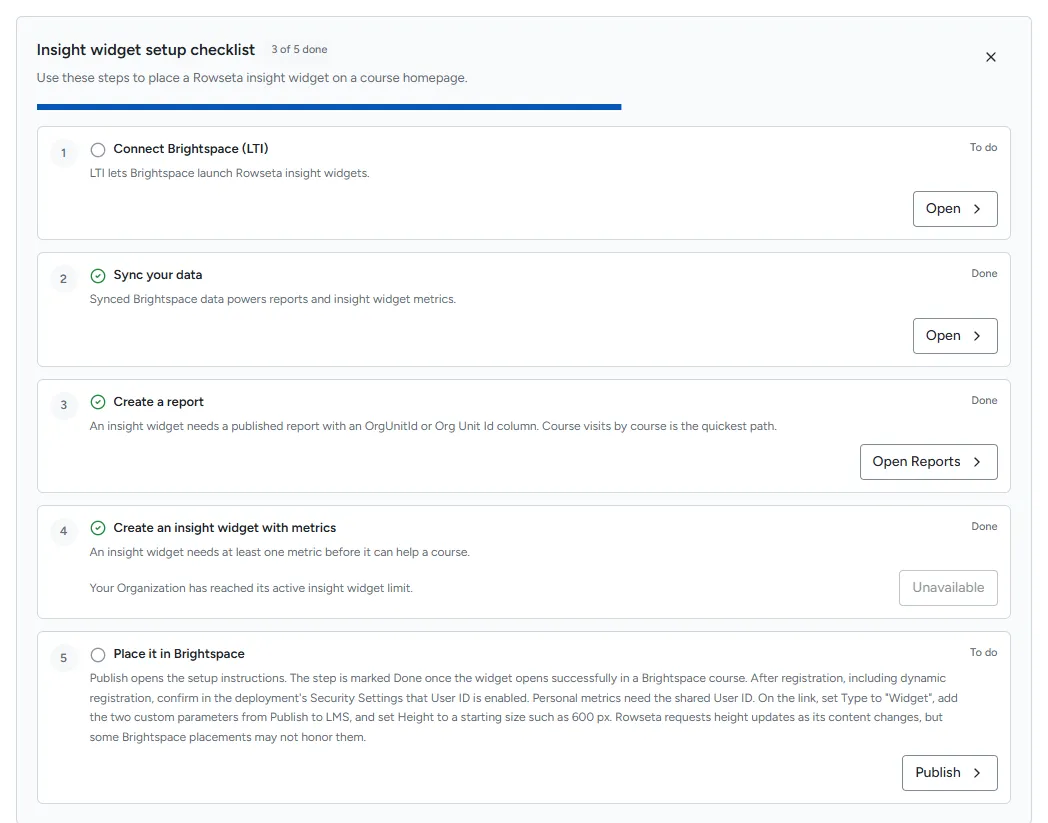
Section titled “How to set one up”- Publish a report that works with insight widgets.
- Create an insight widget and add metrics.
- Register Rowseta for LTI launches (once per Organization).
- Put the widget in a Brightspace course.
The Insight widgets page shows an Insight widget setup checklist with these same steps and marks each one Done as you finish it.