

Courses using this widget
The widget editor’s Courses using this widget section lists every course where someone has opened the widget.
If you don’t see this menu or button, your role doesn’t include it. Ask someone who can edit roles (Owners and Admins by default).
Find a course
Section titled “Find a course”- Open the widget from Insight widgets.
- Under Courses using this widget, read the total: Used in N courses.
- The list shows the 10 most recently launched courses first, each with its course ID and the date of its last launch.
- To find a course, type its course ID or name in Search by course ID or name.
- Select Show more to load the next 10.
If a broad name search reaches the search limit, narrow it when Refine your search to see more courses appears. Rows show course IDs even when the name matched the search.
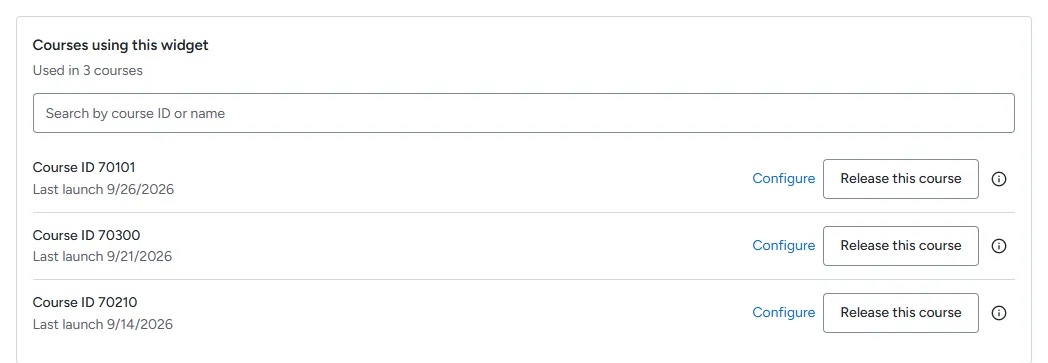
A course appears here the first time someone opens the widget in it. Removing the link in Brightspace does not remove the course from this list.
Configure a course
Section titled “Configure a course”Select Configure beside a course to open its placement page. There you can adjust the course’s metric settings and parameters. See the fixed Configure rule if the link is unavailable.
Release a course (Evaluation)
Section titled “Release a course (Evaluation)”In Evaluation, each course where a widget is opened uses one of your Organization’s course slots. When all slots are used, the widget in any new course shows This Organization is using all of its Evaluation course slots. Release a course you no longer need to free its slot.
- Find the course in the list.
- Select Release this course.
- Read Release this course? and select Release course.
Releasing clears the widget settings for that course, including changes made with Configure. If someone opens the widget in that course again, it takes a slot again if one is free.
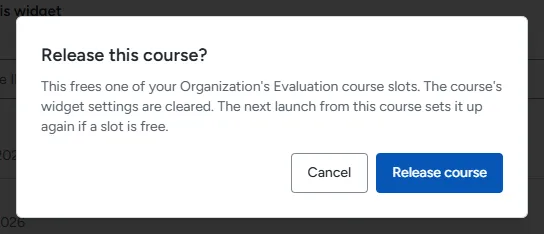
Release this course only appears in Evaluation.